04 · Facial System
Facial Widget
Over 50 facial controllers for expressions, lip sync, and performance-based facial animation.
Overview
The AXIS Facial Widget is a modular, control-rich facial rig system inspired by professional-grade tools such as those used in MetaHuman and Reallusion workflows. It offers over 50 intuitive facial controllers arranged on a customizable, planar layout for direct manipulation in the viewport.
Designed to accelerate expression creation and performance-based facial work, this widget gives access to:
- Detailed shape controls for each facial region.
- Preset expression triggers and viseme slots for lip sync.
- Independent modules like lips, tongue, and jaw, each detachable and positionable for user convenience.
Each controller is backed by carefully tuned constraints and automated corrections for clean deformations. A custom tools panel lets you toggle module visibility or display the full legend directly in the viewport.
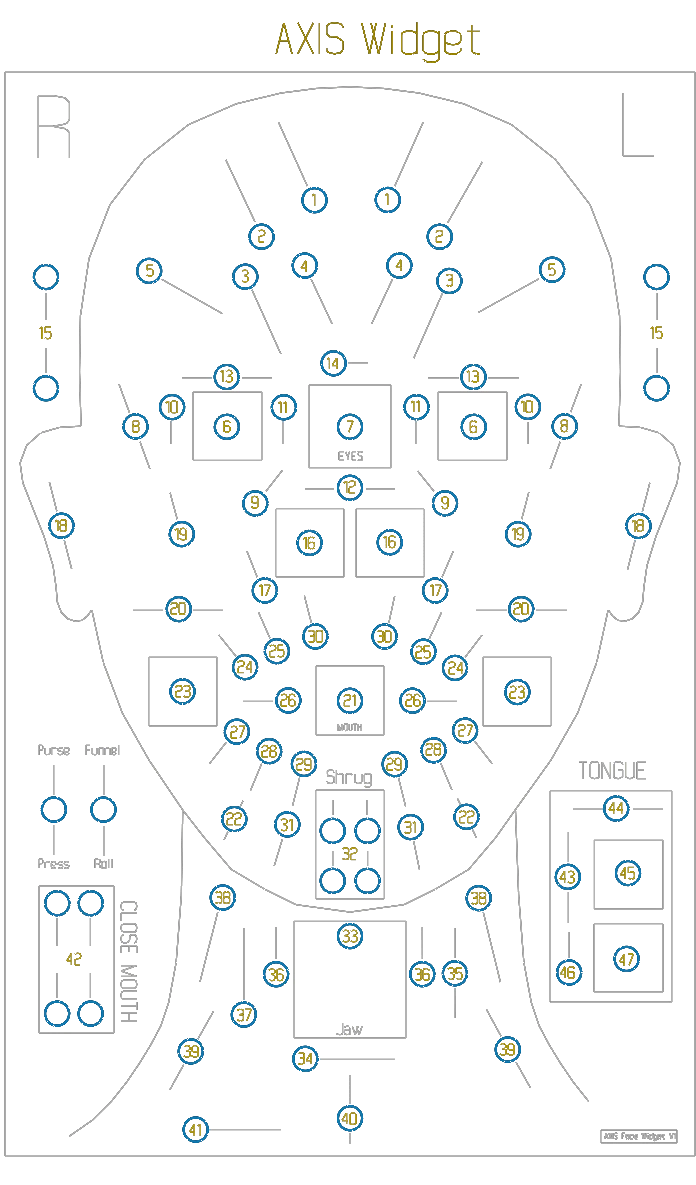
Facial Controls
Forehead / Brows
- 1. browInnerUp (R-L)Raises the inner part of the eyebrow.
- 2. browOuterUp (R-L)Raises the outer part of the eyebrow.
- 3. browDown (R-L)Lowers the entire eyebrow.
- 4. browInnerDown (R-L)Pushes the inner section of the eyebrow downward.
- 5. browSqueeze (R-L)Pulls both brows together to simulate a frown.
Eyes / Eyelids
- 6. eye (R-L)Rotates each eyeball horizontally and vertically.
- 7. eyesControls both eyes simultaneously.
- 8. eyeBlink-Open (R-L)Opens and closes the eyelids.
- 9. eyeSquint (R-L)Narrows the eyes slightly.
- 10. eyelidOuter (R-L)Adjusts the outer edge of the eyelids.
- 11. eyelidInner (R-L)Adjusts the inner edge near the tear duct.
- 12. eyeCrossedMoves both eyes inward or outward.
- 13. pupilDilate (R-L)Enlarges or contracts the pupils.
- 14. focalPointSets eye direction toward a distant point.
- 15. eyelidClose (R-L, U-D)Close the eyelids separately.
Nose
- 16. noseJoystick (R-L)Circular nostril and upper nose motion.
- 17. noseCrease (R-L)Activates wrinkle around the nose.
Ears
- 18. ear (R-L)Moves ears vertically (up/down).
Cheeks
- 19. cheekSquint (R-L)Raises the cheeks.
- 20. cheekInf-Def (R-L)Inflates or deflates cheek volume.
Mouth Base / Corners
- 21. mouthJoystickCentral control for entire mouth.
- 22. mouthCornerFwd-Back (R-L)Pushes mouth corners forward/back.
- 23. mouthCronerJoystick (R-L)Circular motion at mouth corners.
- 24. smile (R-L)Lifts mouth corners.
- 25. smileWiden (R-L)Spreads corners outward.
- 26. mouthDimple (R-L)Pulls dimples inward.
- 27. mouthStretch (R-L)Lateral mouth stretch.
Mouth Shape Detail
- 28. mouthStretchWiden (R-L)Extended horizontal stretch.
- 29. mouthLowerDown (R-L)Pulls lower lip center downward.
- 30. mouthUpperUp (R-L)Lifts upper lip center.
- 31. mouthBlow (R-L)Pushes lips forward (inflate frontally).
- 32. mouthShrug (R-L, U-D)Lifts the entire mouth shape upward in a curved shrug motion.
Jaw / Neck
- 33. jawJoystickCircular jaw movement.
- 34. jawOpenWidenOpens jaw in wider arc.
- 35. jawForward-RecessMoves jaw front/back.
- 36. clench (R-L)Simulates jaw tension.
- 37. chinUpRaises the chin.
- 38. neckTension (R-L)Adds neck muscle strain.
- 39. sternocleidTense (R-L)Tenses muscle from clavicle to ear.
- 40. throatShapes central throat region.
- 41. swallowSimulates swallowing motion.
Mouth Close (For Open Jaw)
- 42. mouthClose (R-L, U-D)Closes lips when jaw is open. Use with jaw open to avoid mesh overlap.
Tongue
- 43. tongueOut-InMoves the tongue forward and backward.
- 44. tongueWideNarrowChanges tongue width (flattens or narrows it).
- 45. tongueJoystickCircular motion of the tongue base.
- 46. tongueUpMoves the tongue upward toward the palate.
- 47. tongueTipJoystickCircular control of the tongue tip.
Lips & Mouth Shapes
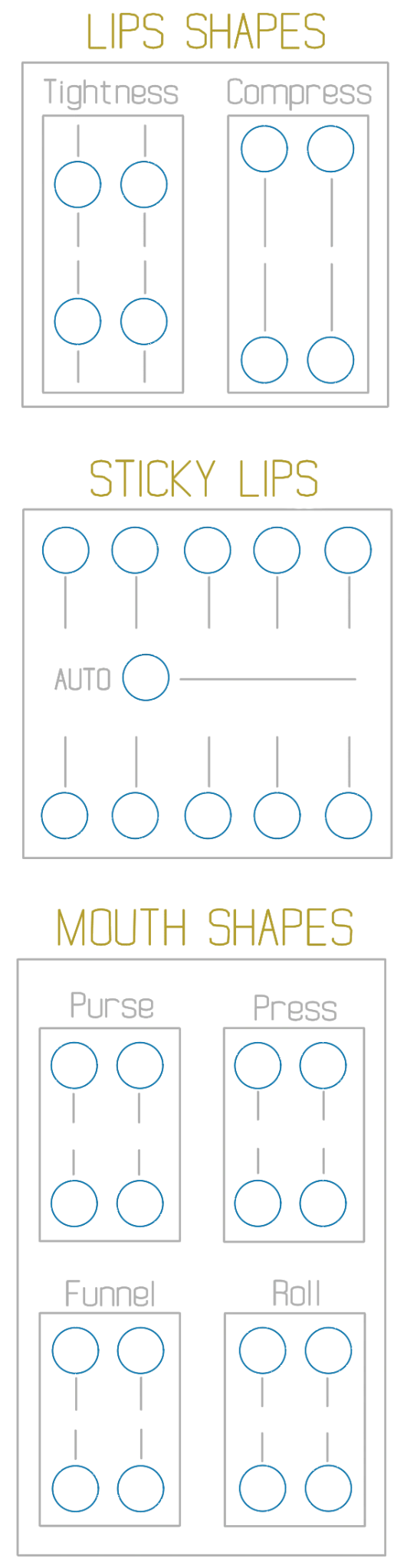
Lips Shapes
This module offers direct control over the tension and volume of the lips.
- TightnessPulls the lips inward as if tensing them. Useful for expressions like anticipation, stress, or closed-mouth tension.
- CompressSqueezes the lips together along the vertical axis. Ideal for closed-mouth shapes, phonemes like "M" or "P", or for adding subtle compression during transitions.
These shapes help reinforce mouth deformation during stylized or realistic facial performances.
Sticky Lips
- Vertical Sliders (Top/Bottom Rows)Each slider controls the offset of a specific lip section. Moving the handle downward (top row) or upward (bottom row) increases the "sticky" resistance in that area, useful for animating gradual release or fine-tuned tension across the lips.
- AUTO SliderEnables automatic sticky lips behavior. When active, the lips will stay slightly sealed and gradually separate as the mouth opens, mimicking realistic adhesion without manual keyframes.
Mouth Shapes
- MouthPurse (R-L, U-D)Contracts the lips inward to create a tight "oo" or kissing shape. Commonly used for phonemes like "w" or expressive pouting.
- LipTightness (R-L, U-D)Applies tension across the lips, sharpening the mouth shape. Ideal for angry expressions, holding back emotion, or stressed poses.
- MouthFunnel (R-L, U-D)Shapes the lips into a circular funnel, simulating a vocal "oo" or "oh" sound. Useful for phoneme-based animation and emphasis.
- MouthPress (R-L, U-D)Vertically compresses the lips together to close or flatten them. Often used to suggest internal pressure or silence.
- MouthShrug (R-L, U-D)Lifts the entire mouth shape upward in a curved shrug motion. Adds stylized movement or subtler facial nuance.
- MouthRoll (R-L, U-D)Rolls the lips inward, tucking them slightly under. Commonly paired with tense expressions or stylized lip closures.
Expressions & Visemes
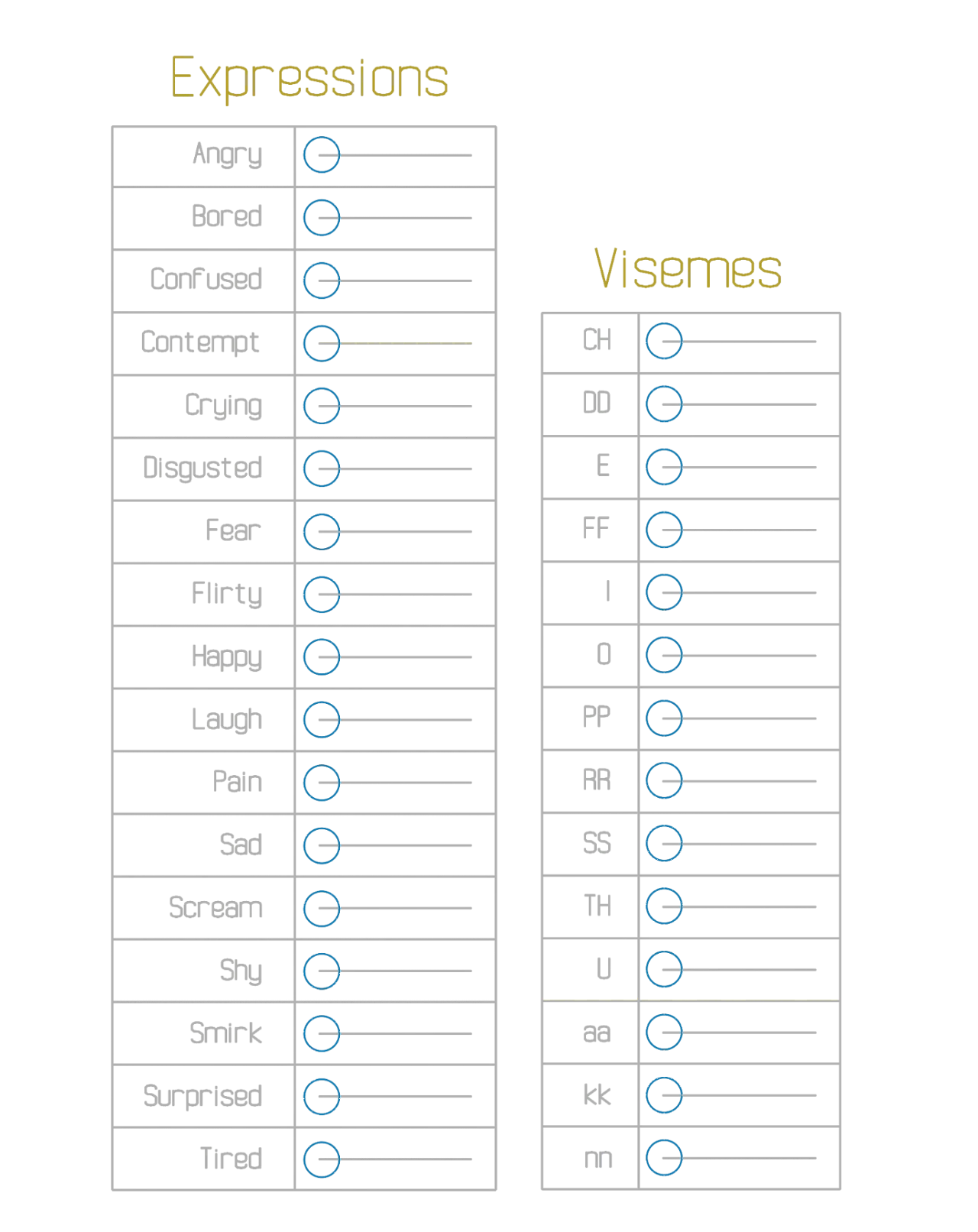
Expressions
The Expressions module provides a curated set of predefined facial combinations for quick and expressive posing. Each slider triggers a complex interaction of facial controls to represent common emotional states like Angry, Sad, Happy, Fear, or Laugh, ideal for storytelling, character performance, or keyframe blocking.
Expressions are fully editable and can be mixed or overridden with the detailed facial controls at any time.
Visemes
Visemes are mouth shapes corresponding to phonemes, the distinct sounds in speech. This module includes a full range of phoneme-based poses (CH, O, FF, TH, aa, etc.), each crafted for natural lip sync. They can be used as-is or blended manually, and combined with the tongue and lip modules for complete dialogue animation.